How to Check your Server for WordPress 2.1 Requirements
According to the WordPress Codex the requirements for the [tag]WordPress[/tag] 2 series are as follows:
WordPress server requirements for Version 2.1:
- PHP version 4.2 or greater
- MySQL version 4.0 or greater
- (Optional) Apache mod_rewrite module (for clean URIs known as Permalinks)
WordPress server requirements for Version 2.0:
- PHP version 4.2 or greater
- MySQL version 3.23.23 or greater
- (Optional) Apache mod_rewrite module (for clean URIs known as Permalinks)
Many hosting providers might not meet the requirements for PHP and MySQL.
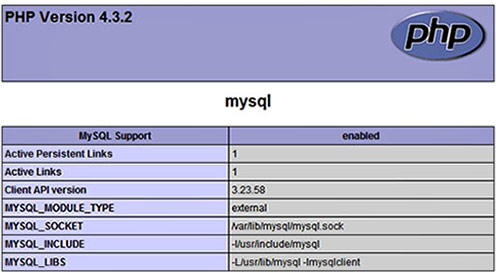
How can you check your server before starting a WordPress upgrade? This can be easily done using a small [tag]PHP[/tag] file to poll your server. You can make you own by copying and pasting the following code in notepad and saving it as ‘info.php’.
<code><?php phpinfo() ?></code>
Upload it to your server’s root directory (public folder) and point your browser to it. For example: http://www.mysite.com/info.php
Alternatively, you can download the file here. Right-click choose ‘Save Target As’ then re-name info.txt to info.php.
You should get an output the looks something this, albeit a bit lengthier.
About Author

One Comment